

In-House IT vs. Outsourcing: Which Is Better for Small Businesses?
Choosing between in-house IT and outsourced IT support can be challenging for small businesses. While both options provide reliable technology support, they differ in cost, expertise, scalability, and day-to-day management.
An in-house IT employee offers dedicated support and a deep understanding of your business, while an outsourced IT provider gives you access to a broader team of specialists and resources. Factors such as cybersecurity, employee support, system documentation, downtime, and future growth all play a role in determining the best fit.
The right choice depends on your technology needs, budget, and long-term goals. Some businesses benefit from dedicated internal support, while others gain more value from outsourced expertise. Many organizations find a hybrid approach works best, combining in-house resources with support from an experienced provider such as Solid Base IT.
Ultimately, the goal is to create a secure, reliable, and scalable IT environment that supports business growth.
What Is the Difference Between In-House IT and IT Outsourcing?
In-house IT and IT outsourcing are two common approaches to managing business technology, but the key difference comes down to who is responsible for providing and managing IT services.
Two Approaches to Managing Business Technology
In-House IT
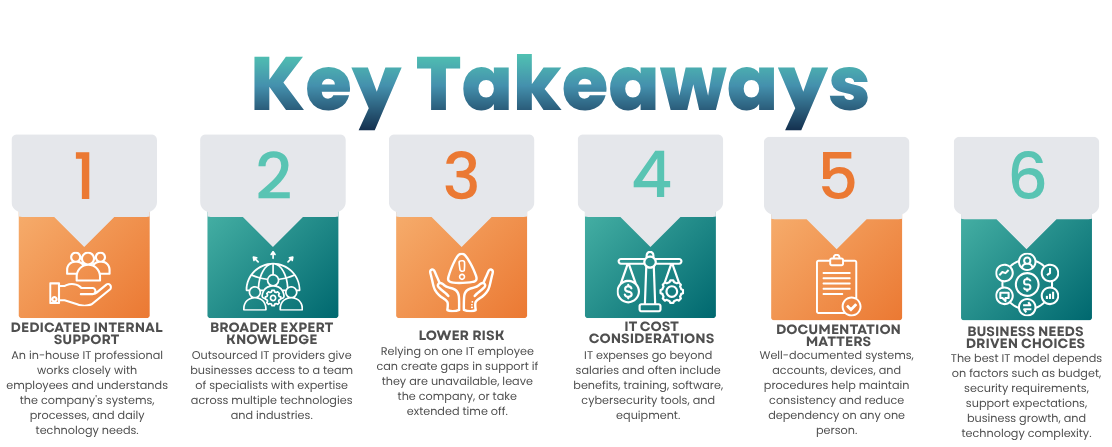
In-house IT involves hiring one or more employees to handle technology functions within the organization. These responsibilities often include technical support, device management, network administration, software maintenance, and cybersecurity. Because they work directly within the business, in-house IT professionals typically develop a deep understanding of company systems, processes, and daily operations.
IT Outsourcing
IT outsourcing involves partnering with an external IT provider to manage some or all technology responsibilities. Services can range from occasional technical support to fully managed IT services that oversee an organization’s entire IT environment. Outsourcing gives businesses access to a broader range of expertise and resources without the need to hire and maintain a large internal team.
Neither approach is automatically the best choice. The right solution depends on a company’s size, technology needs, budget, security requirements, and long-term goals. Many organizations find that a combination of internal staff and outsourced expertise provides the flexibility needed to support growth effectively.
When Does It Make Sense to Hire an In-House IT Employee?
Hiring an in-house IT employee can be a smart investment when a business has enough ongoing technology demands to support a dedicated role. Organizations that rely heavily on technology often benefit from having someone available to provide immediate assistance and work closely with employees throughout the day.
An in-house IT professional may be a good fit if your business:
- Receives frequent support requests from employees
- Requires regular hands-on hardware support
- Uses specialized software or industry-specific applications
- Needs dedicated IT coverage during business hours
- Operates complex internal systems and infrastructure
- Requires close collaboration between IT and other departments
- Prefers to manage technology decisions internally
- Has enough ongoing IT work to keep an employee fully engaged
For example, an internal IT employee can quickly respond when an employee is locked out of an application, needs a new workstation configured, or experiences a hardware issue. These faster interactions can reduce downtime and improve productivity.
Over time, an in-house IT professional also gains valuable institutional knowledge. They become familiar with business processes, technology preferences, and operational challenges, allowing them to provide more personalized support and informed technology recommendations. However, businesses should also consider how IT coverage will be maintained during vacations, illnesses, or employee turnover to ensure continuity.
Benefits of In-House IT
Direct Employee Support
One of the biggest advantages of an in-house IT employee is having a dedicated point of contact for technology issues. Employees know exactly who to call when they need assistance, which can streamline communication and improve response times.
Because an internal IT professional works closely with staff, they often build strong working relationships and gain a better understanding of individual support needs. This familiarity can make troubleshooting more efficient and create a better overall support experience.
Company-Specific Knowledge
An in-house IT employee develops a deep understanding of the organization’s technology environment over time. They become familiar with business applications, workflows, devices, infrastructure, and common technical challenges.
This knowledge can lead to faster problem resolution, more informed technology decisions, and IT strategies that align closely with business goals.
Immediate Physical Assistance
Some technology issues require hands-on support that cannot always be handled remotely. An in-house IT professional can provide immediate assistance when on-site help is needed.
Common tasks include:
- Setting up new computers and devices
- Replacing or upgrading hardware
- Troubleshooting printer issues
- Managing network equipment
- Configuring workstations
- Diagnosing device-related problems
For businesses that frequently require physical IT support, having someone on-site can reduce downtime and improve productivity.
Greater Internal Control
With an in-house IT employee, management has direct oversight of priorities, workload, and daily responsibilities. The employee can also participate in internal meetings, strategic planning sessions, and technology discussions.
This level of involvement allows IT initiatives to be closely aligned with business objectives and operational needs.
What Are the Challenges of Having an In-House IT Department?
While an internal IT team can provide valuable support, businesses should also consider the challenges and risks associated with managing IT internally.
One Employee May Not Cover Every IT Need
Modern IT environments are complex and often require expertise across multiple disciplines, including:
- Networking
- Cybersecurity
- Cloud computing
- Hardware management
- Software support
- Data backup and recovery
- Infrastructure management
- Compliance requirements
- Disaster recovery planning
Even highly skilled IT professionals typically have strengths in specific areas rather than every aspect of technology. As a result, businesses may still need external consultants or specialized providers, such as Solid Base IT, when advanced expertise is required.
A Single IT Employee Can Create a Single Point of Failure
When one employee is responsible for most or all technology operations, the business can become heavily dependent on that individual. Support and critical IT functions may be disrupted if the employee is on vacation, becomes ill, resigns, or leaves unexpectedly.
This risk increases when essential knowledge exists only in that person’s memory rather than being documented and shared.
To reduce business risk, organizations should maintain up-to-date documentation covering systems, networks, applications, devices, vendors, and key procedures. Authorized management personnel should also have access to critical IT information to help ensure business continuity regardless of staffing changes.
When Does IT Outsourcing Make Sense?
IT outsourcing can be a practical solution for businesses that need professional technology support without building and maintaining a full internal IT department. It allows organizations to access specialized expertise, expand support capabilities, and adapt technology services as business needs evolve.
Outsourcing may be a good fit for businesses that:
- Have limited internal IT resources
- Need access to specialized technical expertise
- Want stronger cybersecurity support
- Require assistance with complex IT projects
- Need scalable technology services
- Lack enough IT workload to justify multiple full-time employees
- Want predictable IT support and management
Depending on business needs, an external IT provider may manage specific technology functions or oversee a company’s entire IT environment.
Common outsourced IT services include:
- Help desk and technical support
- Network management
- Cybersecurity services
- Cloud administration
- Data backup and recovery
- Device management
- Software updates and maintenance
- Infrastructure support
- Disaster recovery planning
- IT consulting and strategy
The exact services available will vary by provider and service agreement.
What Are the Benefits of Outsourcing IT?
Access to Broader Technical Expertise
Outsourced IT providers typically employ teams of specialists with experience across multiple technology disciplines. Instead of relying on a single employee, businesses can gain access to expertise in areas such as cybersecurity, networking, cloud computing, infrastructure management, and compliance.
This can be especially valuable when advanced technical skills are needed for complex projects, security challenges, or technology upgrades.
Expanded Support Coverage
An outsourced IT team can often provide broader coverage than a single internal employee. If one technician is unavailable, another team member can typically step in to provide assistance.
This helps reduce support gaps and improve business continuity. Before selecting a provider, businesses should review support hours, response times, and service-level commitments to ensure they align with operational needs.
On-Demand Access to Specialized Skills
Most companies do not need a cybersecurity expert, cloud architect, or network engineer on staff every day. Hiring these specialists full-time may not be cost-effective, particularly for small and midsize businesses.
IT outsourcing provides access to highly specialized expertise when it is needed, helping organizations solve complex technology challenges without expanding payroll.
Scalability for Business Growth
Technology needs often become more complex as businesses grow. Growth can increase the demand for:
- Employee devices
- User accounts
- Business applications
- Cybersecurity protections
- Office locations
- Cloud services
- Network resources
A scalable IT provider can expand services alongside the organization, allowing businesses to support growth without immediately hiring additional IT personnel.
IT Consulting and Strategic Planning
Beyond day-to-day support, many outsourced IT providers help businesses make informed technology decisions. Services may include budgeting, cybersecurity planning, cloud migration strategies, and long-term infrastructure planning.
Working with a partner such as Solid Base IT can help organizations align technology investments with business goals while reducing operational and security risks.
What Are the Disadvantages of Outsourcing IT?
While outsourcing offers many advantages, businesses should also consider the potential challenges before deciding.
Less Direct Control
An outsourced IT provider operates outside of the organization’s internal structure. As a result, businesses must clearly communicate expectations, priorities, and service requirements to ensure technology support aligns with operational goals.
A well-defined agreement and regular communication are essential to maintaining a successful partnership.
Limited On-Site Support
Not every technology issue can be resolved remotely. Hardware failures, equipment installations, and certain network issues may require an on-site visit.
Before signing a contract, businesses should confirm whether on-site support is available, how quickly it can be provided, and whether it is included in the service agreement.
Dependence on an External Provider
Outsourcing reduces reliance on a single employee, but it creates reliance on an external partner. Businesses should establish clear account ownership, document administrative access, and maintain strong contractual protections to reduce risk.
Choosing a reputable provider with transparent processes can help ensure long-term stability and accountability.
Communication Can Impact the User Experience
Employees may need to submit support requests through a help desk or ticketing system rather than receiving immediate assistance from someone in the office.
However, a well-organized support process, clear communication channels, and responsive service can minimize frustration and help employees receive timely assistance when issues arise.
Is It More Expensive to Have IT In-House Than to Outsource It?
There is no single answer because the total cost of IT support depends on a company’s size, technology needs, and long-term goals.
When evaluating an in-house IT employee, it is important to look beyond salary alone. The true cost of internal IT can include:
- Employee benefits
- Recruiting and hiring expenses
- Training and certifications
- Computer equipment
- Software licenses
- Cybersecurity tools
- Monitoring and management platforms
- Professional development
- Additional IT hires as the business grows
The cost of outsourcing varies based on the provider, service level, number of users, technology environment, and support requirements.
Rather than comparing an employee’s salary to a managed IT service fee, businesses should evaluate the total cost of ownership for each option. This approach provides a more accurate picture of the financial investment required to support and secure the organization’s technology.
Which Option Is Better for Cybersecurity?
Neither in-house IT nor outsourced IT automatically provides stronger cybersecurity. Effective security depends on the expertise, tools, processes, and resources available to the business.
An experienced internal IT professional can successfully manage cybersecurity if they have the necessary time, training, and support. However, modern cybersecurity involves a wide range of responsibilities, including:
- Endpoint protection
- Multi-factor authentication (MFA)
- Access management
- Patch management
- Security monitoring
- Backup protection
- Email security
- Incident response
- Employee security awareness training
Managing these responsibilities alongside daily technical support can become challenging for a single IT employee or small IT team.
An outsourced IT provider can often provide access to specialized cybersecurity expertise, advanced security tools, and dedicated monitoring resources. Providers such as Solid Base IT, for example, help businesses strengthen security through proactive management, risk reduction, and ongoing protection strategies. However, organizations should always review the specific security services included in any IT agreement rather than assuming all providers offer the same level of protection.
Why Documentation Matters
Whether IT is managed internally or outsourced, documentation is essential for business continuity and operational efficiency.
Businesses should maintain accurate records of:
- Network configurations
- Devices and hardware inventories
- Software applications
- User accounts
- Access permissions
- Cloud platforms
- Vendor contacts
- Backup procedures
- Security policies
- Disaster recovery plans
Strong documentation reduces the risk of critical knowledge being lost when employees leave or when organizations change IT providers. It also helps technicians resolve issues more quickly and improves the onboarding process for new IT staff.
For small and mid-sized businesses, documentation becomes especially important when key technology knowledge is concentrated in one person.
What Impact Does IT Support Have on Employee Onboarding?
Technology plays a critical role in creating a positive onboarding experience for new employees.
New team members often require:
- A computer or workstation
- Email access
- Business applications
- User accounts
- Network connectivity
- Multi-factor authentication
- File and folder permissions
- Security settings
An internal IT employee can manage these tasks directly, while an outsourced IT provider can perform the same responsibilities when processes and expectations are clearly defined.
The most important factor is maintaining a consistent onboarding process that ensures employees receive secure access to the tools they need from day one.
What About Employee Offboarding?
Just as onboarding is important, employee offboarding is critical for maintaining security.
When an employee leaves the organization, IT should quickly review and remove access to company systems and resources.
This process typically includes:
- Disabling user accounts
- Removing application access
- Revoking permissions
- Recovering company-owned devices
- Transferring business files
- Reviewing administrative privileges
- Updating passwords or credentials when necessary
A well-documented offboarding process helps reduce the risk of unauthorized access and protects sensitive business information.
Whether offboarding is handled internally or by an outsourced IT provider, responsibilities should be clearly documented and consistently followed.
When Does a Hybrid IT Approach Make Sense?
For many growing businesses, a hybrid IT model offers the best of both worlds by combining internal IT resources with outsourced expertise.
For example, an internal IT employee may focus on day-to-day support and hands-on technology needs, while an external provider manages specialized areas that require advanced knowledge.
Internal IT May Handle
- Employee support
- Device setup and deployment
- Hardware troubleshooting
- Basic application support
- Internal IT coordination
External IT May Manage
- Complex technical issues
- Cybersecurity
- Network infrastructure
- Cloud platforms
- Backup and disaster recovery
- Specialized projects
- IT strategy and planning
This approach allows businesses to maintain a familiar internal point of contact while gaining access to a broader range of technical expertise. Many organizations partner with providers such as Solid Base IT to supplement internal resources and fill specialized technology gaps without hiring additional full-time specialists.
A hybrid model is often ideal for businesses that have enough ongoing IT work to justify an internal resource but need expertise across multiple technology disciplines.
How Does Business Size Affect the Decision?
While employee count is an important consideration, it should not be the only factor when choosing between in-house IT and outsourced IT.
Two businesses with the same number of employees can have vastly different technology requirements.
For example, a 20-person company that primarily uses cloud-based applications may have relatively simple IT needs. Another 20-person organization may support:
- Multiple office locations
- Specialized business software
- On-premises servers
- Remote and hybrid employees
- Complex network environments
- Sensitive or regulated data
In this scenario, the second business would likely require more advanced IT expertise and support.
When evaluating IT support options, business leaders should consider not only company size but also technology complexity, security requirements, operational risk, compliance obligations, and future growth plans. The right IT solution is the one that aligns technology resources with the organization’s long-term business objectives.
What Should Businesses Consider Before Choosing Between In-House IT and IT Outsourcing?
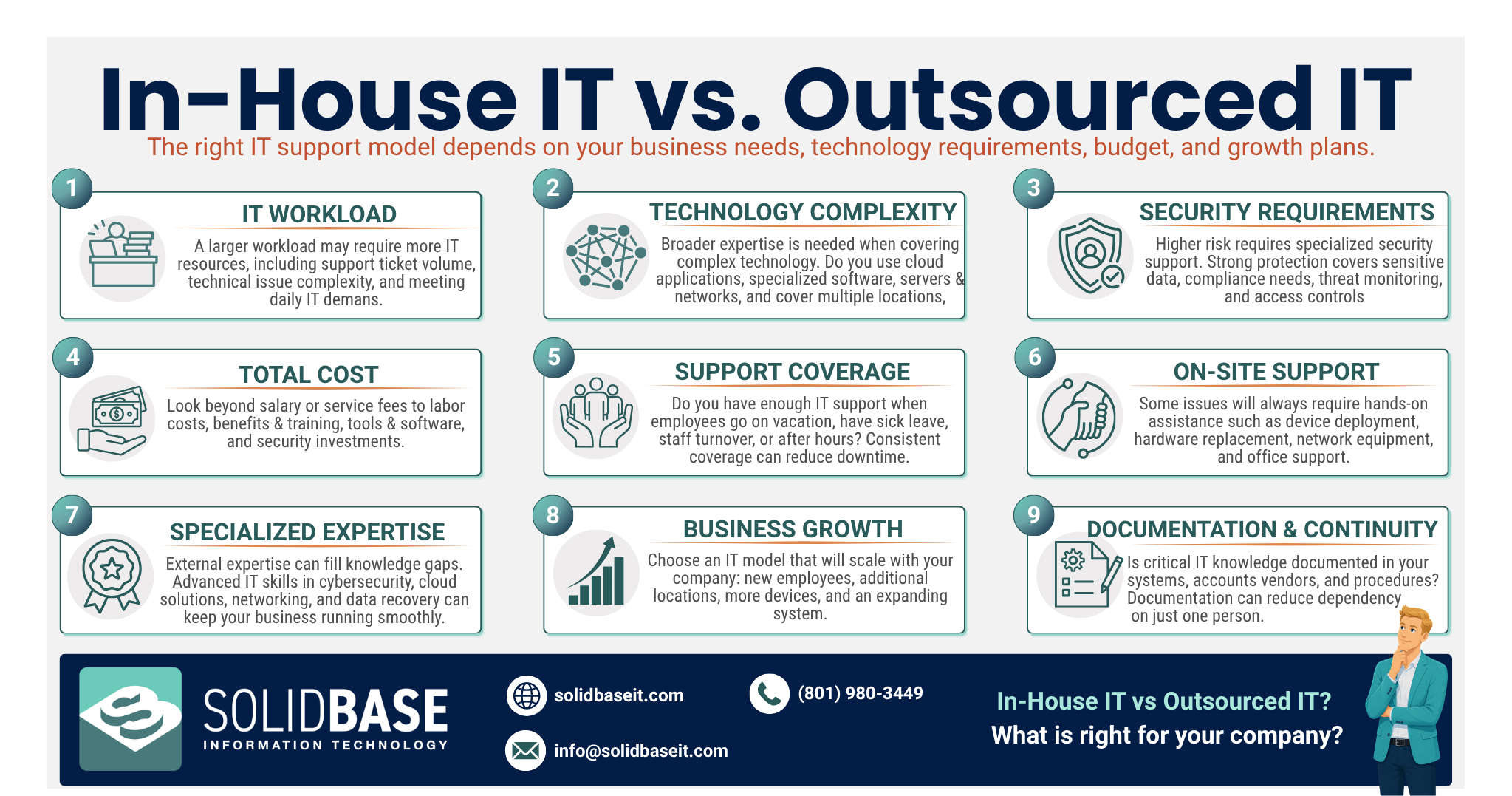
Before deciding whether to manage IT internally or partner with an outsourced provider, businesses should evaluate several factors that directly affect support quality, security, scalability, and overall cost. The right choice depends on both current needs and future business goals.
1. IT Workload
Start by assessing the volume and complexity of technology requests across the organization. Businesses that experience frequent support needs, recurring technical issues, or complex infrastructure challenges may require more resources than a single IT employee can provide.
2. Technology Complexity
The complexity of your technology environment plays a significant role in determining support requirements. Organizations using basic cloud-based applications may need less hands-on support than businesses that manage multiple locations, specialized software, on-premises servers, or complex network infrastructure.
3. Security Requirements
Cybersecurity needs should be evaluated based on the sensitivity of business data, regulatory requirements, and the systems being used. Organizations with higher security risks often benefit from access to specialized cybersecurity expertise, monitoring tools, and proactive security management.
4. Budget
When comparing IT options, businesses should look beyond salary or service fees alone. Total IT costs may include:
- Salaries and benefits
- Recruiting and training
- Hardware and equipment
- Software licensing
- Cybersecurity tools
- Monitoring platforms
- Professional development
- Additional staffing as the company grows
Comparing the total cost of ownership for each model provides a more accurate basis for decision-making.
5. Support Coverage
Businesses should consider how IT support will be maintained when key personnel are unavailable. Vacations, illnesses, employee turnover, and changing workloads can impact support availability. Ensuring consistent coverage is critical to maintaining productivity and minimizing downtime.
6. On-Site Support Needs
Not all technology issues can be resolved remotely. Hardware deployments, device replacements, network equipment installation, and other hands-on tasks may require physical support. Companies should determine how frequently on-site assistance is needed when evaluating their IT strategy.
7. Specialized Expertise
Many businesses require expertise in areas such as:
- Cybersecurity
- Cloud computing
- Network administration
- Data backup and recovery
- Infrastructure management
- Compliance and risk management
If these skills extend beyond the capabilities of an internal resource, businesses may benefit from partnering with an experienced IT provider such as Solid Base IT to supplement existing expertise.
8. Business Growth Plans
Technology needs often evolve as organizations grow. Adding employees, office locations, applications, devices, and cloud services can significantly increase IT demands. Choosing a support model that can scale alongside the business helps avoid costly disruptions and staffing challenges in the future.
9. Documentation and Business Continuity
Regardless of the support model, comprehensive IT documentation is essential. Businesses should maintain accurate records of:
- System configurations
- User accounts
- Devices and hardware
- Software applications
- Vendor information
- Security policies
- Backup procedures
- Operational processes
Proper documentation reduces dependence on any single employee or service provider while making transitions, troubleshooting, and future growth much easier to manage.
Final Decision: Should You Use In-House IT or Outsource IT?
The decision between in-house IT and outsourced IT support should be based on the organization’s unique requirements rather than simply choosing the option that appears less expensive or easier to manage.
In-House IT May Be the Better Fit When a Business:
- Requires daily, hands-on support
- Needs frequent on-site assistance
- Wants direct control over technology operations
- Benefits from an employee with deep organizational knowledge
IT Outsourcing May Be the Better Fit When a Business:
- Needs access to broader technical expertise
- Wants stronger cybersecurity capabilities
- Requires extended support coverage
- Needs specialized skills on demand
- Expects technology needs to grow over time
A hybrid IT model can provide the advantages of both approaches by combining an internal technology resource with external expertise from a trusted provider such as Solid Base IT.
Frequently Asked Questions
It all comes down to the company’s technology workload, its budget, its security requirements, and its growth plans; in-house IT offers direct support together with specific knowledge of the company, while outsourcing gives access to outside expertise and extra resources.
Lorem ipsum dolor sit amet, consectetur adipiscing elit. Ut elit tellus, luctus nec ullamcorper mattis, pulvinar dapibus leo.
The main benefit is that you have a dedicated employee who knows about the company’s technology environment and who can give direct support to the employees.
By outsourcing a business can obtain a wider variety of technical expertise and also gain access to extra support resources without having to employ a number of specialists.
On the contrary, the cost will vary according to the requirements of the company and the services covered by the agreement. Businesses should compare the total cost of employment, the tools, the expertise, the support coverage, and the outsourcing services.
Perhaps one employee will be enough for a business that has simple technology requirements. However, as the systems become more complicated, the employee will then need extra support or specialist external expertise.
Companies keep full ownership of their systems‚ accounts‚ data‚ and policies‚ even when technical work is done externally‚ typically through contracts‚ documentation‚ access controls‚ and ownership configurations of the systems․
A hybrid model can work when a business needs an internal employee for daily support as well as requires external expertise for cybersecurity, infrastructure, complex projects, or additional coverage.

- PinPoint Tech: Should You Outsource IT or Hire In-House? A Cost-Benefit Analysis for SMBs
- Eventura: Outsourced vs. In-House IT Support: What’s Right for Your SME?
- Hubstaff: Outsourcing vs. In-house: Which is Better?
- Solid Base IT: Co-Managed IT Support: Small and Mid-sized Business (SMB) Teaming Guide
- Solid Base IT: Best Managed IT Service Providers for Growing Businesses: Choosing the Right Partner
- Solid Base IT: Seven Questions to Ask IT Support Providers in Utah