


At 8:15 on a Monday morning, a 120-employee manufacturing company discovered that its file server was down. Employees couldn’t access customer records, orders stopped moving through production, and the two-person IT team was overwhelmed trying to diagnose the issue while fielding support calls. What started as a technical problem quickly became a business problem, costing time, productivity, and revenue.
Situations like this are becoming increasingly common as small and mid-sized businesses grow and their technology environments become more complex. That’s why many organizations turn to managed IT service providers (MSPs) to gain the expertise, monitoring, and support needed to keep systems running smoothly and securely.
Why Small and Mid-Sized Businesses Need Managed IT Services
Reliable technology support is essential for small and mid-sized businesses (SMBs) to maintain productivity, protect sensitive data, and support long-term growth. As companies grow, their IT environments become more complex due to increasing numbers of employees, cloud applications, connected devices, remote workers, and cybersecurity requirements. These challenges can quickly overwhelm a small in-house IT team.
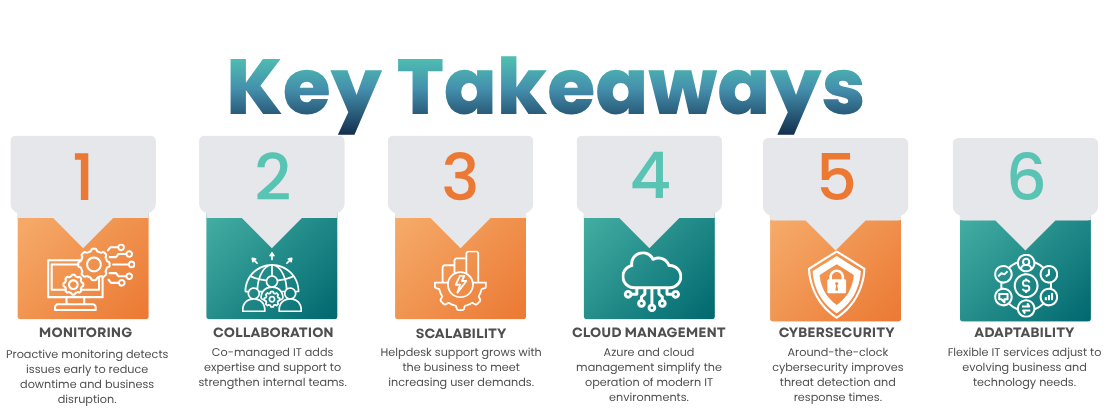
A managed IT service provider (MSP) helps businesses address these demands by delivering proactive IT support, infrastructure management, 24/7 monitoring, cloud solutions, and cybersecurity services. For organizations with 50 to 500 employees, the right MSP can also complement internal IT staff through a co-managed IT services model, providing additional expertise and resources without replacing existing teams.
Not all managed service providers offer the same level of service or expertise. When evaluating MSPs, businesses should consider factors such as technical capabilities, service offerings, scalability, cybersecurity expertise, response times, and the provider’s ability to integrate seamlessly with their internal IT team. Choosing the right partner can improve operational efficiency, strengthen security, and support future business growth.
What Is a Managed IT Service Provider?
Remember the manufacturing company from our opening story? When its file server unexpectedly went down on a busy Monday morning, a small internal IT team was left scrambling to restore access, answer support requests, and keep operations moving. Situations like this highlight the role of a managed IT service provider (MSP): a trusted technology partner that helps businesses prevent issues, respond quickly when problems arise, and maintain secure, reliable IT systems.
A managed IT service provider is an external company that delivers ongoing technology services and support under a service agreement. Depending on a business’s needs, an MSP may manage help desk support, network infrastructure, cloud environments, cybersecurity, endpoint devices, backups, monitoring, and other critical IT functions.
Unlike the traditional break-fix model, which addresses problems only after they occur, managed IT services focus on proactive monitoring, maintenance, and optimization. The goal is to identify and resolve potential issues before they disrupt employees, customers, or business operations.
For small and mid-sized businesses (SMBs), this approach provides access to a broader range of technical expertise without the cost of hiring specialists for every area of IT. An MSP acts as an extension of the internal team, delivering the resources, tools, and knowledge needed to support growth, improve security, and increase operational efficiency.
Why Do Small and Mid-Sized Businesses Use Managed IT Services?
As businesses grow, their technology needs often outpace the capacity of a small in-house IT team. More employees, devices, cloud applications, and cybersecurity requirements create additional complexity, making it difficult to balance day-to-day support with long-term strategic initiatives.
In the case of our manufacturing company, the internal IT team was responsible not only for resolving employee issues but also for managing infrastructure upgrades, securing the network, maintaining cloud platforms, and supporting business-critical systems. When unexpected problems occurred, strategic projects were often delayed while the team focused on immediate support needs.
Managed IT services help close this gap by providing additional capacity and specialized expertise in key areas, including:
- Help desk and end-user support
- Proactive infrastructure monitoring
- Cybersecurity protection and threat management
- Cloud management and Microsoft Azure services
- Network administration and performance optimization
- Device and endpoint management
- After-hours and emergency technical support
- IT maintenance, patching, and system optimization
For the manufacturing company, proactive monitoring could have detected warning signs before the server outage impacted employees. With access to additional expertise and around-the-clock support, the internal team would have been better positioned to focus on strategic business initiatives rather than reacting to technology emergencies.
The value of a managed IT service provider extends beyond solving technical problems. The right MSP helps organizations implement a more proactive, secure, and scalable approach to technology management, enabling business leaders to focus on growth while ensuring their IT environment remains reliable and protected.
What Should Businesses Look for in a Managed IT Service Provider?
Choosing the right managed IT service provider (MSP) is about more than comparing monthly costs. Businesses should evaluate an MSP’s ability to provide proactive support, strengthen security, scale with growth, and work effectively alongside internal teams. The best providers help prevent problems, not just fix them.
1. Proactive Monitoring and IT Maintenance
A reliable MSP should take a proactive approach to managing technology. Rather than waiting for employees to report issues, the provider should continuously monitor systems for performance problems, security risks, capacity constraints, and infrastructure failures.
Proactive monitoring helps businesses:
- Reduce downtime
- Detect issues before they impact users
- Improve system performance and reliability
- Minimize disruptions to day-to-day operations
Questions to ask:
- What systems do you monitor?
- How often are alerts reviewed?
- Who investigates potential issues?
- What is your escalation process?
- How quickly are critical problems addressed?
A provider’s answers can reveal whether they focus on proactive management or primarily deliver reactive support.
2. Scalable Help Desk Support
As organizations grow, IT support requests increase. Password resets, device issues, software troubleshooting, and access requests can quickly consume an internal IT team’s time.
A managed IT provider should offer a structured help desk that delivers timely support while reducing the workload on internal staff.
Evaluate:
- Support hours and availability
- Ticket submission and tracking processes
- Response and resolution times
- Escalation procedures
- Remote support capabilities
- Ability to handle increasing ticket volumes
- Communication with internal IT teams
The goal is consistent support that scales alongside the business.
3. Co-Managed IT Services
Not every organization needs to fully outsource IT. Many businesses benefit from a co-managed IT model, where the MSP works alongside an existing internal IT team.
In a co-managed partnership, internal staff can focus on business strategy and user relationships while the MSP provides support for:
- Help desk overflow
- Infrastructure monitoring
- Cloud management
- Cybersecurity
- After-hours support
- Specialized projects
- Routine maintenance
When co-managed IT makes sense:
- Internal IT teams are stretched thin
- Specialized expertise is needed
- Business growth is increasing technology demands
- Hiring additional full-time staff isn’t practical
For many mid-sized businesses, co-managed IT provides flexibility without significantly increasing staffing costs.
4. Cloud and Microsoft Azure Expertise
Cloud platforms such as Microsoft Azure require ongoing management to maintain security, performance, and cost efficiency.
An experienced MSP should be able to support:
- Microsoft Azure environments
- Cloud infrastructure management
- Identity and access controls
- Performance monitoring
- Resource optimization
- Cloud security and compliance
- Ongoing maintenance and support
Businesses investing heavily in cloud services should ensure their MSP has proven cloud expertise and certifications.
5. 24/7 Cybersecurity Monitoring
Cybersecurity should be a primary consideration when evaluating any MSP. Threats don’t follow business hours, and many attacks occur overnight, on weekends, or during holidays.
A qualified provider should offer:
- Security monitoring
- Threat detection and response
- Endpoint protection
- Access management
- Vulnerability management
- Incident escalation and support
Questions to ask:
- Do you provide 24/7 security monitoring?
- How are security alerts investigated?
- What happens when a threat is detected?
- How quickly are incidents escalated?
- Which security services are included versus billed separately?
Understanding security coverage upfront helps prevent costly surprises later.
6. Scalability for Future Growth
The right MSP should support your business not only today but also as it grows.
As organizations expand, they often add:
- Employees
- Offices and locations
- Remote and hybrid workers
- Cloud applications
- Devices and endpoints
- Security requirements
- Business-critical applications
A provider that can support a 50-person company may not be equipped to support a 500-person organization. Scalability should be evaluated before growth creates challenges.
7. After-Hours and Remote Support
Modern businesses operate beyond traditional office hours. Employees may work remotely, travel frequently, or require support across multiple time zones.
An MSP should clearly define:
- Support availability
- Emergency response procedures
- After-hours coverage
- Remote support capabilities
- Service-level commitments
This is particularly important for organizations that depend on cloud applications, distributed workforces, or mission-critical systems.
8. Transparent and Predictable Pricing
Managed IT services can help create more predictable technology budgets, but not all pricing models are equal.
Before signing an agreement, businesses should understand:
- Which services are included
- Support hours and limitations
- Cybersecurity coverage
- Cloud management services
- Project-related fees
- Additional or optional costs
- Pricing changes as the organization grows
- Renewal and contract terms
The lowest-priced MSP is not always the best value. Focus on the services, expertise, and outcomes included in the agreement.
9. Technical Expertise
An MSP’s technical capabilities should align with your technology environment.
Look for experience with:
- Microsoft 365
- Microsoft Azure
- Cloud applications
- Hybrid and remote work environments
- Networking infrastructure
- Cybersecurity technologies
- Backup and disaster recovery solutions
The provider should complement your internal capabilities and provide expertise where gaps exist.
10. Communication and Service Management
Technical skills alone don’t guarantee a successful partnership. Effective communication and well-defined service processes are equally important.
A strong MSP should provide:
- Clear roles and responsibilities
- Defined escalation paths
- Regular service reviews
- Transparent reporting
- Detailed documentation
- Consistent communication with stakeholders
The best managed IT providers become a strategic partner, helping organizations improve technology performance, security, and long-term business outcomes.
What Are the Benefits of Outsourcing IT Support?
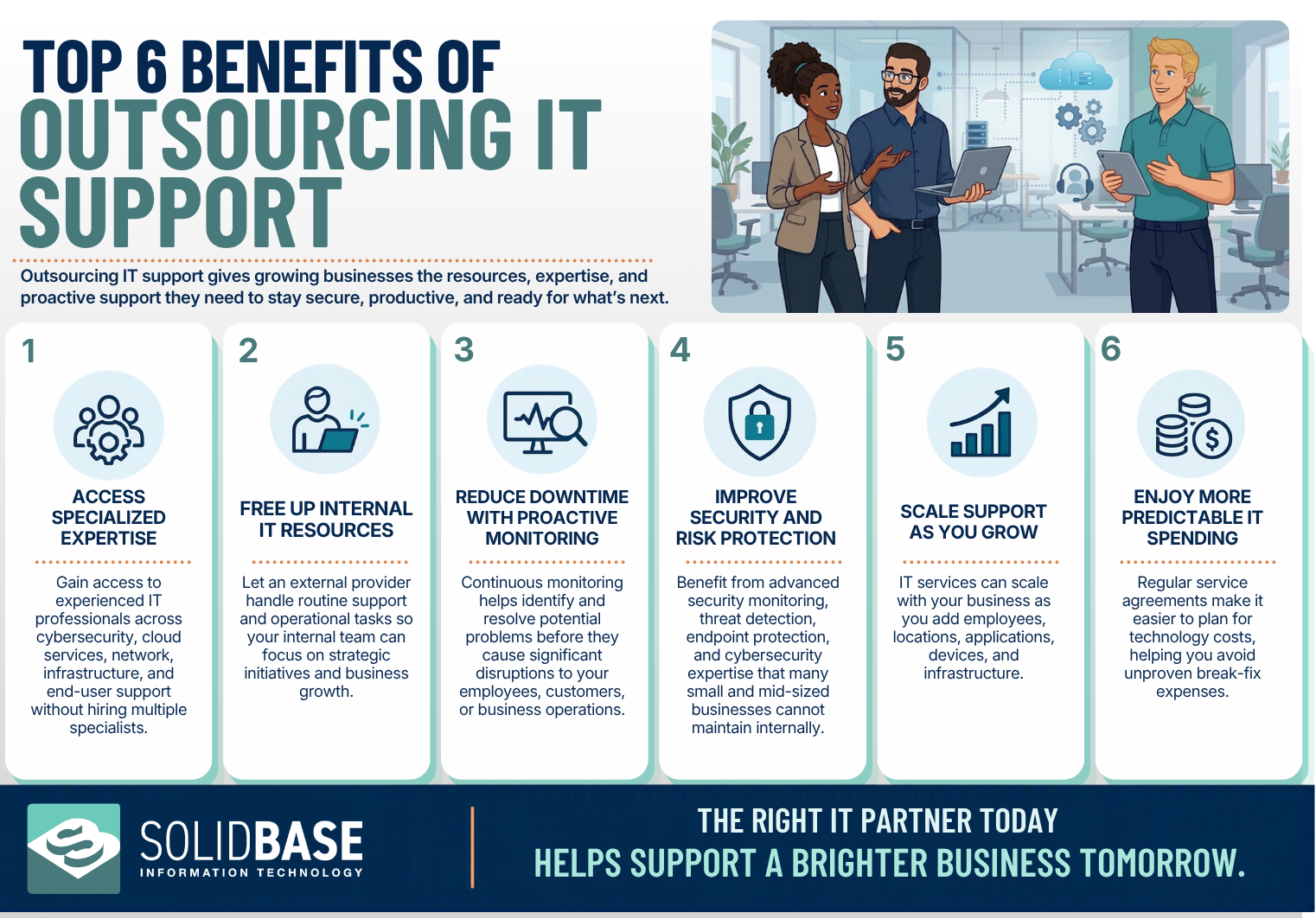
For growing businesses, outsourcing IT support provides more than technical assistance. A managed IT service provider (MSP) can help improve efficiency, strengthen cybersecurity, reduce downtime, and give organizations access to specialized expertise without the cost of building a larger internal IT team.
What Are the Signs Your Business Needs a Managed IT Service Provider?
There isn’t a specific employee count that determines when a business should invest in managed IT services. However, certain challenges often indicate that your technology needs are beginning to exceed your current resources.
A managed IT service provider (MSP) can help when internal teams are spending more time reacting to technology issues than supporting business growth.
Common Signs You Need an MSP
IT support requests are increasing
Growing organizations typically experience a higher volume of help desk tickets, user issues, and technology requests.
Your IT team is overwhelmed with routine tasks
When internal staff spend most of their time resetting passwords, troubleshooting devices, and resolving everyday issues, strategic projects often take a back seat.
Systems aren’t being proactively monitored
Without continuous monitoring, minor performance issues can turn into costly outages and downtime.
Cybersecurity demands are increasing
As cyber threats evolve, many businesses struggle to maintain adequate security monitoring, compliance, and risk management internally.
Cloud environments are becoming more complex
Managing Microsoft Azure, Microsoft 365, cloud applications, remote access, and user permissions requires specialized expertise.
You need after-hours support
Organizations with remote employees, multiple locations, or critical business systems often require support beyond normal business hours.
Specialized IT expertise is missing
Many internal IT teams are highly capable but may not have deep expertise in cybersecurity, cloud infrastructure, compliance, networking, or disaster recovery.
Your business is expanding
Opening new offices, adding employees, and adopting new technologies can quickly increase IT complexity.
Technology issues are impacting productivity
Frequent outages, slow systems, and recurring technical problems can lead to lost productivity and employee frustration.
Hiring IT talent is becoming difficult or expensive
Recruiting and retaining experienced IT professionals can be costly, making outsourced IT support an attractive alternative.
The strongest provider is the one that best fits the organization’s operational requirements, not the one with the largest service catalog.
Bottom Line
If your IT environment is becoming more complex, your internal team is stretched thin, or technology issues are affecting operations, it may be time to consider partnering with a managed IT service provider. The right MSP can provide additional expertise, proactive support, and scalable resources to help your business grow.
Why Is Solid Base IT a Good Fit for Small and Mid-Sized Businesses?
As businesses grow, technology becomes more complex, cybersecurity risks increase, and internal IT teams are often expected to do more with limited resources. That’s where a managed IT partner can make a meaningful difference.
Solid Base IT is built to support small and medium-sized businesses (SMBs) and mid-market organizations that need reliable, scalable IT services without hiring specialists for every technology role. Whether a company has an internal IT department or limited in-house resources, Solid Base IT provides the expertise and support needed to keep technology running efficiently and securely.
Comprehensive Support for Growing Businesses
Solid Base IT’s service offerings align with many of the challenges organizations commonly face as they scale, including:
- Co-managed IT support
- Help desk services
- Proactive infrastructure monitoring
- Microsoft Azure and cloud management
- 24/7 cybersecurity monitoring
- Network and endpoint management
- After-hours technical support
This combination helps businesses reduce downtime, improve security, and maintain productivity without overburdening internal teams.
Flexible Co-Managed IT Solutions
For organizations with an existing IT department, Solid Base IT acts as an extension of the internal team rather than a replacement.
A co-managed IT model allows internal staff to remain focused on business priorities and strategic initiatives while Solid Base IT provides support in areas such as:
- Help desk overflow
- Cybersecurity management
- Cloud administration
- Infrastructure monitoring
- After-hours support
- Specialized technical projects
This approach gives businesses access to additional expertise and capacity while maintaining control over their technology strategy.
Scalable Services That Grow With Your Business
Technology requirements rarely stay the same. As organizations add employees, locations, cloud services, devices, and applications, IT demands increase as well.
Solid Base IT provides scalable managed IT services designed to adapt to changing business needs, helping organizations support growth without constantly expanding internal IT headcount.
A Proactive Approach to IT Management
The value of a managed service provider extends beyond troubleshooting technical problems. Solid Base IT emphasizes proactive monitoring, preventative maintenance, cybersecurity protection, and ongoing technology management designed to identify issues before they impact business operations.
For growing businesses, that means less time reacting to technology issues and more time focused on strategic growth.
Conclusion
Selecting a managed IT service provider is ultimately about finding a partner that aligns with your business goals, technology requirements, and future growth plans.
The best MSPs do more than resolve support tickets. They provide proactive monitoring, reliable help desk services, cybersecurity expertise, cloud management, and strategic guidance that helps organizations operate more efficiently and securely.
When comparing managed IT providers, focus on the challenges your business needs to solve today and the capabilities you’ll need tomorrow. Consider factors such as scalability, cybersecurity, cloud expertise, response times, co-managed support options, and long-term partnership value.
For small and mid-sized businesses looking to strengthen their IT operations, Solid Base IT delivers a comprehensive approach that combines co-managed IT support, proactive monitoring, Microsoft Azure expertise, and 24/7 cybersecurity services. The result is a more secure, reliable, and scalable technology environment that supports business growth today and into the future.
Frequently Asked Questions
Traditional IT support generally concentrates on fixing issues after they have arisen, while managed IT services usually offer continuous support, monitoring, maintenance, and management with the aim of reducing problems and keeping the IT environment in good condition.
When IT is co-managed, the company’s own IT department collaborates with an external provider. This arrangement can provide extra helpdesk capacity, specialized expertise, monitoring, cloud management, cybersecurity, or after-hours support.
Co-managed IT support is a type of collaboration in which an external managed IT provider and an internal IT team share responsibilities based on the resources and needs of the company.
A business operating in this category should usually take into account scalable helpdesk support, proactive monitoring, co-managed IT options, expertise in cloud and Azure, cybersecurity coverage, after-hours support, transparent pricing, and experience in providing support to organizations of a similar level of complexity.
Proactive monitoring enables potential IT problems to be identified before they turn into serious disruptions and it can enhance visibility, system reliability, and the response to emerging issues.
Cybersecurity should be a major consideration when evaluating an MSP. Businesses should determine which security services are included, how threats are monitored, how incidents are escalated, and whether coverage is available 24/7.
Managed IT services do not necessarily replace internal IT employees. Co-managed support can supplement an existing team by handling specific responsibilities or providing additional expertise and capacity.
An MSP can provide additional technical resources as an organization grows. This can help manage increasing employee support requirements, cloud adoption, cybersecurity needs, infrastructure complexity, and additional locations.
The strongest MSP relationship is one that provides the business with dependable technology support while offering the flexibility to adapt as its people, systems, security requirements, and operations continue to grow.

- 7 Signs Your Business Has Outgrown Internal IT Support
- Building Secure IT Systems
- IT Support for Growing Small to Mid-Sized Businesses
- How to Choose the Best IT Support Company
- In-House IT vs. Outsourcing: Which Is Better for Small Businesses?
- Help Desk Outsourcing Companies: What Mid-Sized Businesses Should Look for in 2026
- 7 Questions to Ask IT Support Providers in Utah